Little Boy Vlog VN Code Template – Nowadays, you will notice that people often simply create a video and upload it to YouTube or Instagram Reels. However, merely creating such standard, run-of-the-mill videos is no longer sufficient. To keep up with the times, you need to incorporate elements that make your content truly engaging. For instance, you must utilize “viral hooks”—specific, captivating elements designed to grab attention. These hooks are precisely what compel a viewer to stay glued to the screen and watch the video in its entirety, thereby boosting your video’s engagement metrics. Ultimately, this increases the likelihood of your video going viral. There is one such editing style that is currently trending massively—so why not learn how to master it? We will show you exactly how to execute this type of editing yourself. In today’s article, we will discuss how you can achieve this viral editing effect with the help of a VN Code. We will outline the specific steps you need to follow to implement this technique, and we will also share tips on how you can use this method to help your own videos go viral.
Details Of Little Boy Vlog VN Code Template
What exactly is this “viral editing”? Let me first explain the editing process itself. Take a look at what appears at the very beginning: it features a young child. This is actually a viral clip in which a boy—covered in dirt and mud—walks forward while holding a camera. The effect is designed to make it look as though the boy is vlogging, though in reality, he is not. What happens next? After a few seconds, your own video clip is introduced. The scene transitions—complete with a visual effect—and your video takes over the screen. This is presented in a “Before & After” or “Then vs. Now” style, leading viewers to believe that the initial footage is your own older content, when in fact, it is simply a viral clip. Many people are currently creating videos using this technique, garnering millions of views and likes in the process.
What Exactly Is VN Code Editing?
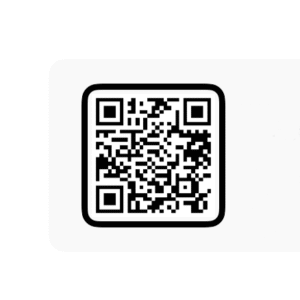
It is a specialized form of editing in which you are provided with a specific code—specifically, a QR code. This code encapsulates all the editing parameters, effects, animations, and transitions; they are pre-configured within it. This allows you to effortlessly apply a specific editing style. While you do need to utilize the code, it is essential to first understand the application process; once you grasp it, the editing will be performed automatically, eliminating the need for any manual adjustments on your part.
Why should you use the VN application?
There are numerous reasons to use this app, chief among them being the complete control it offers you. You can manually adjust effects and—importantly—you won’t encounter any watermarks. Your edits will turn out looking absolutely professional. Tools such as keyframes and speed controls are readily available and easy to use, ensuring a completely smooth performance. Even if you own a low-end device, you can still expect excellent performance from this application.
How to Use
To use the code, you need to open the VN Editor application. Here, you will find a scanner option. To begin, you will utilize this feature with the QR code. Simply launch the VN Editor app; you will find the scanner option located at the top of the screen. Click on it. Since you need to scan from a file, navigate to the ‘Gallery’ option and select the code from there. Once you select the code, the entire project file will become available to you. Download it, and you will then see an option to use the project. From there, you can insert your video clips. Next, click on ‘Next.’ Finally, review the final preview of your video, export it, and you’re all set!