Horror Girlfriend Ai Photo Editing Prompts – If you check out my Instagram right now, you’ll notice that certain types of photos are going incredibly viral. People are transforming their ordinary selfies into cinematic, horror-themed images. If you, too, want to create these “movie poster-style” horror photos—where you appear on one side with a spooky character sitting right beside you—then you are going to absolutely love this editing tutorial, as it has already become a huge hit with so many others. People are creating their own videos using this concept; I will walk you through the step-by-step process, which you can easily follow to create your own versions. I will teach you how to create the photo itself, and subsequently, how to turn that image into a video—thereby maximizing your chances of going viral. I’ll show you how to create both of these assets.
Details Of Horror Girlfriend Ai Photo Editing Prompts
This tutorial is all about editing—specifically, how to transform any ordinary photograph into a dark, eerie, or even spooky image. The process automatically incorporates various elements based on your preferences—whether you wish to give the photo a darker aesthetic, create a cinematic look, add a haunted background, or apply a special effect where a mysterious, smoky figure appears behind you. The system will automatically generate and insert these types of characters; I have already embedded these instructions within the prompts, clearly defining exactly what needs to be done. You can simply follow these guidelines to create your own unique images.
Why is this style of “horror editing” going so viral?
The reason for its viral success is the immense attention it is garnering on Instagram. When people come across photos that look this realistic, they pause to take a closer look. They stop scrolling to examine the image in detail. Consequently, this boosts the content’s impressions, pushing it into the feeds of even more users—which is precisely how it goes viral. Furthermore, it delivers a truly cinematic aesthetic; you get to experience a completely unique style of editing. Your content becomes truly original—allowing you to create photos that stand out distinctly from the rest. The editing process itself is quite simple; in fact, you can create these photos even without possessing any prior editing skills.
Best AI Tools for Creating Ultra-Realistic Photos in 2026
Now, let’s look at the tools you will need to create truly exceptional photos. First on the list—taking the very top spot—is ChatGPT. With this tool, you can generate images so realistic that they will look exactly as if you had taken the photograph yourself. Coming in second is Google Gemini. While it currently falls just slightly short of ChatGPT, future updates could potentially propel it to the top spot; nevertheless, you can still create excellent images using it. Our third entry is the Bing Image Creator; this tool, too, allows you to generate some impressive images. You should definitely give this one a try as well.
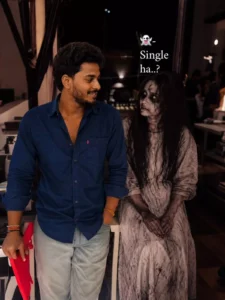
The ghost girl has pale cracked skin, dark hollow eyes, messy long black hair, dirty vintage white gown with horror makeup, sitting beside him with eerie expression.realistic skin texture, horror-comedy vibe, ultra detailed, DSLR photography, shallow depth of field, Instagram reel aesthetic, cinematic color grading, soft glow lights, realistic night atmosphere, 9:16 ratio ultra realistic, 8K, highly detailed facial features, dramatic mood 100% same face and dono ek dusre ki taraf dekhte hue hone
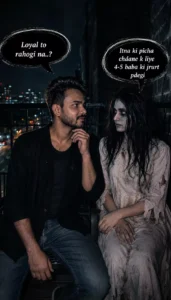
A cinematic medium shot of a young Indian man with a mustache and beard, wearing a black unbuttoned shirt and blue jeans, standing next to a terrifying female ghost. The ghost has long, messy black hair, pale grey skin covered in dirt, dark hollow eyes, and is wearing a tattered, soiled white gown. They are looking directly at each other in a dimly lit, dark room at night. Dramatic side lighting highlights their faces, creating a spooky and tense atmosphere.
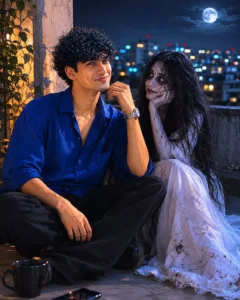
The uploaded man's face exactly as in the reference photo without changing facial features at all. Create a high-quality cinematic horror-comedy scene inspired by the reference balcony image. The young Indian man is sitting casually beside a cute but spooky female ghost on a dark balcony at night with city lights blurred in the background.
How To Create Image In Chatgpt?
To create a photo, you need to open ChatGPT. Here, click on the “plus” icon to upload a reference photo—specifically, one that you particularly like. You should select an image in which your face is clearly visible and well-defined; ideally, your face should be centered within the frame and properly lit. If you use a truly perfect, high-quality reference photo, your facial features will never appear mismatched in the final result. Next, you need to paste the prompt—specifically, the one provided in the accompanying article. Once pasted, proceed to generate the image. This will produce an absolutely stunning photo, delivering a result that you are sure to find impressive.
Conclusion
I’ve explained editing to you thoroughly. Your photo must have turned out well. I hope so. I’ve explained everything perfectly. If you have any problems, or if you can’t do it, please leave a comment and we’ll explain it to you.