Trending Mahadev CapCut Template 2026: If you are looking for a simple way to create a powerful and emotional Mahadev video for Instagram Reels, YouTube Shorts, or other social media platforms, the Trending Mahadev CapCut Template 2026 can be a great option. This template combines devotional visuals, dramatic transitions, emotional text, cinematic effects, and powerful Lord Shiva imagery to create an eye-catching video.
In recent times, devotional edits based on Mahadev have become popular among social media creators. Many users want to create these videos but do not have enough experience with professional editing software. A ready-made CapCut template makes the process much easier because most of the effects and transitions are already prepared.
In this guide, Rohan Editz explains how the Mahadev CapCut template works, what type of clips you should use, and how you can create your own devotional video in just a few simple steps.
What Is the Trending Mahadev CapCut Template 2026?
The Trending Mahadev CapCut Template is a pre-designed video editing format based around Lord Shiva. Instead of creating every effect manually, you can use the existing template and replace its sample clips with your own videos or photos.
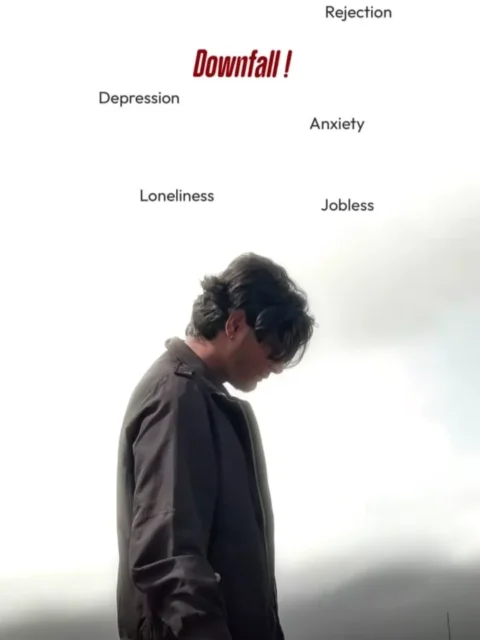
The editing generally follows an emotional storyline. At the beginning, the subject may appear serious, sad, or thoughtful. Words connected with difficult situations, such as Downfall, Depression, Anxiety, Failure, or Loser, can appear as part of the visual concept.
After these emotional moments, the video transitions into a more powerful devotional section. The subject may look toward the sky while a dramatic image of Mahadev appears in the background. Lightning, glow effects, transitions, music, and cinematic visuals can make the second part of the video feel much more energetic.
The overall theme represents moving from difficult circumstances toward strength, faith, and hope through devotion to Mahadev.
Note: Some CapCut templates may not be available in certain countries or regions due to restrictions imposed by CapCut. If the Use Template button doesn’t work, try opening the link directly in the latest version of the official CapCut app or try again later. Clicking the button will redirect you to the original CapCut template in a new tab. We are not affiliated with or endorsed by CapCut. All trademarks, templates, logos, and related content remain the property of their respective owners. We simply provide links to publicly available templates for informational and user convenience.
Features of the Trending Mahadev Edit
One reason this template attracts creators is its combination of emotional storytelling and cinematic editing. Depending on the version of the template, you may find features such as:
- Dramatic transitions between clips
- Devotional Lord Shiva visuals
- Cinematic lighting and glow effects
- Emotional background music
- Animated text
- Beat-synchronized transitions
- Slow-motion effects
- Lightning and atmospheric effects
- Ready-made filters and color adjustments
- Short-video format suitable for social media
These elements are already arranged in the template, which means you do not have to manually recreate the complete editing sequence.
Why Use a CapCut Template?
Creating a professional-looking video from scratch can take considerable time, especially for beginners. A CapCut template reduces much of that work by providing a ready-made editing structure.
The biggest advantage is convenience. You usually only need to select your own clips and place them into the template. The application then applies the preset transitions, effects, animations, and timing automatically.
Templates are also useful when you want to experiment with trending editing styles. You can understand how different clips look with particular transitions and effects without having advanced knowledge of video editing.
Another benefit is that the editing can be completed directly from a smartphone. This makes the process convenient for creators who regularly publish Instagram Reels, YouTube Shorts, WhatsApp Status videos, or other short-form content.
How to Use the Mahadev CapCut Template
Using a CapCut template is generally straightforward. Before starting, make sure the CapCut application is installed on your device and that you have suitable photos or video clips ready.
Follow these steps:
Step 1: Open the Trending Mahadev CapCut Template from the template link provided on the relevant page.
Step 2: The template will open in CapCut, where you can preview the complete editing style.
Step 3: Tap the Use Template or Use button, depending on the version of the application.
Step 4: Select the photos or video clips you want to include in your edit.
Step 5: Check the preview carefully and make sure the selected clips fit the transitions and timing.
Step 6: Continue with the editing process and allow CapCut to generate the video.
Step 7: Preview the final result and make any available adjustments before exporting or sharing it.
The exact buttons may vary depending on your CapCut version, device, region, or template availability.
What Clips Should You Use?
Choosing suitable footage can make a noticeable difference to the final result. For the opening portion, you can use a serious-looking portrait, walking clip, or slow-motion video that matches the emotional theme.
For the devotional section, a clip where you are looking upward, standing calmly, or appearing thoughtful may work well. Vertical footage with good lighting is usually preferable for Reels and Shorts.
Try to avoid extremely shaky or low-resolution videos. A clear clip with a simple background will generally blend better with dramatic effects and transitions.
Tips for a Better Mahadev Video
To make your final video more attractive, choose footage that matches the mood of the template instead of randomly selecting clips. Keep the subject clearly visible and use high-quality vertical videos whenever possible.
You can also experiment with different clips to see which one fits the template’s timing best. If the template contains text representing struggles or difficult moments, select footage that naturally matches the emotional beginning of the edit.
Most importantly, keep the devotional theme respectful. The purpose of this type of edit is generally to express faith, motivation, strength, and devotion through creative video editing.
Mahadev CapCut Template for Instagram Reels and Shorts
The vertical format of this style of edit makes it suitable for platforms that focus on short-form videos. You can use the finished video for Instagram Reels, YouTube Shorts, Facebook Reels, or similar platforms, depending on the platform’s current requirements.
Adding an appropriate caption and relevant keywords can also help your content reach people interested in Mahadev, Shiva edits, devotional videos, and spiritual content.
Conclusion
The Trending Mahadev CapCut Template 2026 provides an easy way to create an emotional and cinematic devotional video without manually building every editing effect. By selecting suitable clips and following the template’s structure, beginners can produce a visually engaging Mahadev-themed edit within a short time.
The combination of emotional storytelling, dramatic transitions, cinematic effects, and Lord Shiva-inspired visuals makes this style particularly suitable for short-form devotional content. If you enjoy creating Mahadev status videos, Instagram Reels, or YouTube Shorts, experimenting with this template can be a simple way to explore a trending editing style.
For more new CapCut templates, AI editing ideas, and easy video-editing tutorials, keep visiting Rohan Editz for fresh content and creative editing inspiration.
Frequently Asked Questions (FAQs)
What is the Trending Mahadev CapCut Template 2026?
It is a pre-designed CapCut video editing template featuring a Mahadev/Lord Shiva-inspired devotional theme, dramatic transitions, text effects, and cinematic visuals.
Do I need professional editing skills?
No. Templates are designed to simplify the editing process. You mainly need to select your own photos or video clips and follow the instructions shown in CapCut.
Can I use my own video in the Mahadev template?
Yes. If the template supports video replacement, you can select your own suitable clips and apply the preset editing style to them.
Is the Mahadev CapCut template free?
The availability and usage terms can vary between templates and regions. Check the template page in CapCut to see whether the particular template is currently available for free.
Why is my template link not opening?
Template availability can change, and some links may stop working or may not be available in certain regions. Make sure CapCut is installed and updated, then try opening the template again.
Can I use this edit for Instagram Reels?
Yes, you can generally use a suitable vertical CapCut edit for Instagram Reels. Before uploading, preview the video to make sure important text and visuals are positioned correctly.
What type of video is best for this template?
Clear vertical footage with good lighting works well. Serious, emotional, walking, or upward-looking clips can complement the storyline of this particular style.
Can beginners create this Mahadev video?
Yes. The main purpose of a ready-made template is to make this type of editing easier for beginners by providing preset effects, transitions, animations, and timing.