Dopamine Capcut Template – I always tell you to create unique content because the competition you’ll face will only increase over time, and you can already see that. The editing is becoming incredibly advanced. Since advanced editing techniques have become available, you’ll see that these kinds of videos have gone viral on social media, especially on Instagram. Many people want to create them, but this article will explain exactly how to achieve this kind of editing. Here, I’ll show you how to create this viral video using CapCut templates and how to get great results, step by step.
Full Breakdown Of This Editing
Regarding the full editing process, this is a completely unique editing style, which is why people are liking it. It starts with a normal clip, and you should know that you’ll need a total of three or four clips. You can use different clips, or even four different parts of a single clip. Now, use your creativity and see what unique things you can do. After that, you’ll see a blur effect in the effects section. Then, you’ll see a cutout effect being created. This cutout effect is essentially a frame from your second video that is cut out and placed onto your first video. Then it goes back and is fixed onto the original video. If you want to know how to create this cutout effect, I’ll explain it in the following frames/articles/paragraphs.
How to create this cutout effect?
Is it really easy to create? Yes, absolutely easy. Let me tell you. First, add any two clips. You can add as many clips as you want. I’m just giving an example. Just understand the process. Then, click on the first clip, and then when you click on the second clip, it will stop at its first frame. Now, what you need to do with this frame is transfer it to the overlay. Now, place it between the first and second clips. You can place it at the beginning of the second clip or in the center of the first clip, or even in the last three or four seconds. Select this overlay and go to the “Remove Background” option to remove its background. Then, add a keyframe at the end of this photo’s frame. Add another keyframe at the beginning. Then, scroll it down, and your cutout effect will be ready in your video.
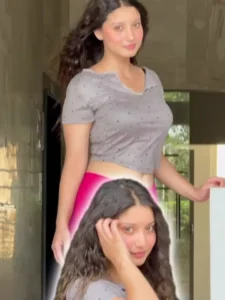
How To Use This Dopamine Capcut Template
Let’s understand the video creation process. Look, we have a template. Now we just need to add our clips to it. How do we do that? It’s very easy. You need to have CapCut installed. Only then will it work perfectly for you. The template is shown in the article. You just need to click on “Check Template” below, and it will open directly in CapCut. There, you’ll see an option to select videos. Click on that, and then select your best clips, or follow the recommendations I mentioned earlier. Add the clips, click “Next,” and your final preview will be ready. That’s how you can create your video.
Conclusion
This is how you can easily do this viral social media editing. It requires no effort, and you’ll get 100% perfect results because it doesn’t require much work. And there’s one more thing I want to tell you: you’ll see that other people are also doing this type of editing on various songs. I’ve already shown you how to create the cutout effect. Just match it perfectly with the beat, and your video will be ready with 100% best results.