Girl Car Entry Ai Video Editing – Look, you must have seen some such videos going viral on social media, which are created in a very unique way and people like them a lot, so because of this I decided that now I will also work on some AI content so that you people can learn something new. Templates are fine. I will keep providing them to you according to the trending. You will get templates according to the trend as well. But I want you to learn something different and unique along with that, which will be very useful for you in the future because you will see that the future is going to be based on AI only. If you do not have knowledge about these tools, then you will have problems in editing.
Details of Girl Car Entry Ai Video Editing
In this video, you’ll see two boys sitting together. I’ll tell you one thing: you must use the image carefully to get good results. Let me explain. Look, two boys are sitting together. For example, when you cook, you sit in one place. Wherever your stove is, you’ll see other people sitting there, eating or watching. This was common in ancient times, and it depicted something like this. You’ll see two boys sitting there, and then a car comes from behind. It’s unexpected. It’s a Scorpio. A girl comes out of it and starts cooking in front of the boys. This video was generated using proper AI. Each prompt contains the details: “This is what’s needed.” This is how it should be. Then, that thing has been generated, and I’m going to tell you all the steps to do it.
How will you prepare the photo?
The most important thing to understand is that the photo you use here must be used correctly. Using any other photo won’t yield this kind of result, because the resulting photo video is of a girl cooking. What you need to do is place some cooking utensils in front of you. Then, click your photo from a different angle. Only then will the photo be perfectly formed. When you use the prompt, a girl’s car will come driving from the front. A girl will emerge from the car. She will come and start cooking your food, and some words are also written on the side. I’ll explain them later. You should understand how to generate someone.
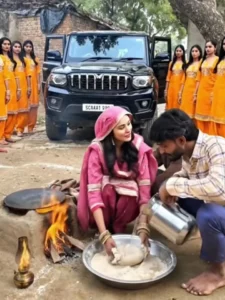
8-second cinematic comedy video, ultra-realistic, 4K, film look, **REFERENCE IMAGE REQUIRED**, **LOCK MAIN MAN IDENTITY – SAME PERSON ONLY**, face must match the reference 100%, do NOT change, replace, beautify, or age the man, keep the man seated in the SAME POSITION, not moving; a BLACK SCORPIO arrives and stops dramatically nearby, 3 VERY BEAUTIFUL women step out quickly, one woman immediately sits down near a chulha and starts kneading atta seriously, the other 2 women join her and all 3 knead and roll dough together energetically, the first woman looks at the man and says “Baby… I got late in coming, the car got punctured,” then she asks “What should I make… paratha roti?”, the man stays seated and replies casually “Make something too, baby,” funny expressions, cinematic lighting, shallow depth of field, meme timing, dramatic yet hilarious mood.
How To Generate Your Video
Look here in the article, I’ve provided a prompt. Your first step is to copy it. Then, click on the “Create Video” option below. This will take you directly to the Google Flow website. You’ll be prompted to log in first. It’ll say “Create Key Floor.” Click on it, select your Gmail ID, and log in without logging in. You can’t proceed or generate a video. Then, you’ll see the “New Project” option. There, you’ll need to change the “Text to Video” option to “Frame to Video.” Below, you’ll find several “Plus” options. There are two options, so click on the first option. You’ll need to upload the photo. Yes, I just explained this. You’ll need a photo like this. Then, paste the prompt. Then, click “Generate.” This will do it: it will prepare your photo with the best possible result.
Conclusion
I’ve explained how to create this trending video, in a completely accurate and easy way. I’ve also provided you with many more similar articles. If you want to check it on our website, just go to the AI photo editing category. There, you’ll find all the new AI articles. If you want to create any kind of video, you can find it there and create it.