Instagram Trending DP Ai Photo Editing Prompt – Look, right now, people are liking the DP editing that is trending on social media, and if you want, you can also create such viral DP editing. By creating such editing, you can use it as your DP on Instagram. People will see it. Such editing is created in a very creative way, in which their name is also visible. A neon type effect is achieved. Editing is done in a completely professional manner, in which your photo is matched well with the background, and this thing is not done manually at all. We will create it automatically and will also tell you. How easy is it to create such editing?
Details Of Instagram Trending DP Ai Photo Editing Prompt
This DP being created involves something like this: Normally, if you use a normal DP, it won’t attract the audience as much. However, if you use this type of DP, the audience will definitely visit your profile. If you see it, five out of ten people will visit your profile, whereas a normal DP won’t. From there, if you create a normal DP, it will be quite simple. The background will be attractive. Colors are added to it. The background is kept in the same color. This means that it won’t be a solid color. It may have buildings or any other abstract background. Then, color is added to it and these colors are applied to your face and body, etc. You may have heard of rim light. You create it in it, and it takes a lot of effort to create it. But you don’t have to create it that way; you can create it easily, without any manual steps.
How Do You Create Such a DP?
Look, different prompts in different styles are provided for creating DPs. To create them, we use tools like Google Chatgpt or Grok. All of them provide results with their own slight variations. You can use any one. By the way, I provided a link to Google Gemit. Use that. The results are good and it’s quick to create. You’ll be given a prompt. Copy the one you like and your DP will be created in that style. After that, click on Create Image below. There, you’ll go to Google Gemini. Select Create Image and then paste the prompt. Go to the Plus option and upload the photo. Here, you’ll need to make some adjustments to the prompt. Like you will have to add name there and if you want colors etc. then you can also add colors etc. and then generate it and in a few seconds your DP is perfectly made and ready.
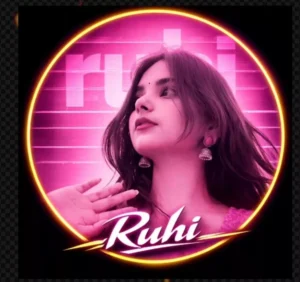
"A circular profile picture design featuring use given image. The image has a strong monochromatic green and neon magenta aesthetic. The background features large, translucent block text reading 'neha' and a horizontal CRT scanline texture overlay. At the bottom, there is sharp, stylized white text that reads 'neha'. High contrast, digital fan art style, glowing neon lighting."
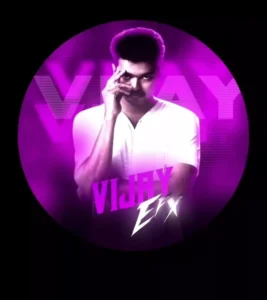
"A circular profile picture design featuring Indian young boy. He is wearing a crisp white button-down shirt and looking intensely at the camera with a serious expression, his right hand raised with fingers touching his temple. The image has a strong monochromatic purple and neon magenta aesthetic. The background features large, translucent block text reading 'Sagar' and a horizontal CRT scanline texture overlay. At the bottom, there is sharp, stylized white text that reads 'Sagar FX'. High contrast, digital fan art style, glowing neon lighting."
How To Customize In Editing
Now, customization is also essential. A lot, because if I provide you with a promotion and everyone creates photos in the same style, you’ll say that everyone will start copying it. This means everyone’s DP will be in the same color. Now, in trading, it’s essential to use the same color. But you still want a little customization of your color or whatever. If it’s your preference, then when you use the promotion, do this: change the colors, like the picture in it. Change the color. If you want a background, adjust it to your liking, for example, use an abstract background or a different type. Then, after that, you’ll see your name appear there, just like your name is added to your DP. While changing that, add a different font type and change its style as per your convenience.
Conclusion
This way, you can convert your normal photo into a professional DP. In the past, you might have noticed that it took a lot of time. However, nowadays, you can complete what would take hours in minutes. We’ve shown you how to create a similar image using prompts, which you can do in seconds. If you need any other type of trading editing in the future, be sure to visit our website, as I’m always sharing new things that are happening.