Into Stardust Effect Capcut Template – While browsing Instagram, I noticed that girls, just like boys, were also creating videos with this kind of editing. So I thought, why not explore a unique editing technique where your video starts normally, and then the subject disappears from the frame? This trend has gone viral on social media. If you want to create such a disappearing video, I’ll show you how in this article. I’ll explain how to record the video and share all the details in this article. So, if you want to try this viral editing technique, don’t go anywhere else. Read this article carefully, as all the steps and details will be shared here.
Details Of Into Stardust Effect Capcut Template
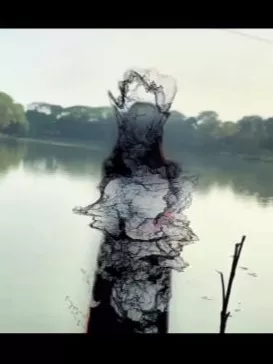
This Stardust effect starts with a completely normal clip in the editing process, and as the beat effect kicks in, at a certain point, your video begins to transform into a particle dust effect. This means that the person or object in the video gradually breaks apart into particles and then completely disappears, dissolving into the air. Finally, the entire background becomes empty and blurred. This video was created in a very emotional way, giving it a cinematic touch. This template already has these details added. You just need to add a video clip, and the effects and cinematic touch will be applied automatically. If you want to know the recording process, I will tell you how to record and add this type of video.
How To Record Your Video Clips
Look, I’m going to tell you about recording the video. Recording a video is very easy. Whenever you record a video for this purpose, you can do it in any style, but you need to record your video in landscape mode. You can mount it on a tripod or have a friend record it. I’ll tell you my style, how to record it to get a good response. You must have seen Shah Rukh Khan spreading his arms wide. You just need to spread your hands in that same style. After that, you simply record the video. Now, what will happen is that when you add the video to the template, the dust effect will be applied to the area where you spread your arms. Your video will start disappearing from that point. So this is a great idea that will work very well for your video.
What’s special about this status template?
Well, the best thing about it is how smoothly it starts. At the very beginning, you see a normal video, and then the effect kicks in, transforming your video into a stardust effect. A dissolve effect is applied, meaning the video gradually disappears. The particles start flying around, and eventually, the entire video vanishes. The color grading becomes completely cinematic, and the background looks fantastic. It provides a truly amazing result. I’ve already explained the details of what you’ll see. If you like this template, I’ll explain the process of using it below.
How to use the template?
We’ve already provided you with the template. Now you’ll see a “Check Template” button below it. When you click on it, it will open directly in CapCut. Here, you’ll need to select a video. You can select any type of professional video from your device. As I explained earlier, regarding the type of video to record, if you understand that, it will be very easy for you. Just add the video accordingly, then click “Next,” and once the preview of your video is ready, you can export it. That’s it, your editing is complete.