Ishq Mubarak Ai Video Editing – New trends keep coming to Instagram. You’ll notice that sometimes a normal video will appear, sometimes an AI one, and sometimes something else. People create different types of videos based on different trends. And let me tell you, editing these trends is very easy these days. To create a video using them, I’ll explain every detail in this article. This will ensure your video is ready in a professional manner, and you won’t miss a single thing. So, be sure to follow these steps once.
Details Of Ishq Mubarak Ai Video Editing
This editing is something like this, you are shown with a mobile in which you are looking at the mobile and there a message comes on the mobile, then that message is shown in a pop-up and on your screen. Meaning it will be shown in the video itself. Then after that he lies down on the ground. As he takes that land which is a Banjara land, it gets converted into a whole garden of flowers. It gets converted into a lush green field and it seems as if you are sleeping comfortably among them. When this transition happens, people get surprised after seeing this transition that how can a normal video be like this, but this is the era of AI. You should know. Anything can happen and I will tell you how it will happen?
Editing Process Of This Video
Before you begin editing your video, first add your standard video to any editing application. Save the video, including the audio. Select the part of the video where you want to add the transition and delete the previous section. Then, take a screenshot of the last frame of the video and save it. Now, let’s learn the rest of the editing.
How To Create Image
Now first of all see how you will make the video, for this first of all you have to use the screenshot, for that first of all we will convert that photo from our normal photo to that kind of grass photo, for that we will use Google gemini, so first of all a prompt has been provided to you here. You have to copy it. Then after that you have to click on create image below and after that as you will go to Google website. You have to upload that screenshot. Then after that you paste your prompt and you generate, then your normal photo will be converted into grass photo. Now let us understand the further process.
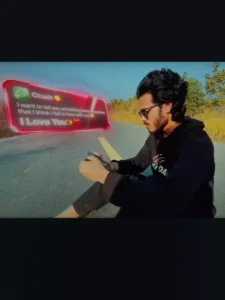
Image Prompt:-
Edit the uploaded image.Strictly keep the original person exactly the same.Do not change face, skin tone, hairstyle, clothes, body posture or proportions.Do not zoom in.Do not crop.Keep the exact same camera height and body size as original image.Replace only the background and ground.The person must be lying naturally inside a very dense wild flower field.Camera must remain high top view but far enough to show full body clearly.No zoomed perspective.No dramatic lens distortion.Natural 35mm lens look.Flowers must be tall long-stem wildflowers, waist to chest height.Extremely dense and tightly packed around the body.Flowers touching shoulders, legs and arms naturally.The person should look partially surrounded but not artificially covered.No empty ground visible.No road.No trees.No background blur.Use realistic natural flowers (cosmos, wild daisies, small sunflower type, poppy style).Colors: pink, white, yellow, red, orange.Add realistic green stems and leaves.Golden hour sunlight.Natural shadow direction matching original body lighting.Ultra photorealistic.RAW photo style.DSLR natural photography.High texture detail.No painting style.No CGI look.
Video Prompt:-
the subject's upper body gradually begins to dissolve,and video are zoom out drone shot style animated
How To Generate Your Video
Now, I’ll tell you the process for converting it to video. Look, converting it to video is a very simple process. If you’re using Google Drive, we’ve provided a frame for that as well. Copy it, and then you’ll find a Create Video button below. Click on it. Once there, sign up and go to New Project. Change the text-to-video format and convert it to a frame-to-video. What this will do is convert your video from a normal video to a frame-to-frame video. Once you upload your photo, first upload a normal screenshot, and secondly, upload your photo of the grass. Then, paste the video and generate it. This will make your video ready.
Final Touch
After that, you’ll need to do the final editing. To do this, first go back to where you took the screenshot of your video and add the video you generated from your own video. Your video is ready, just the way you want it. Simply set the music accordingly.