Lifting Home Ai Video Editing – If you look on social media, many such videos are going viral which are being generated from this and I have not yet taught you any such editing. But then I decided. Why not tell you such editing which is going viral on social media right now. After creating which you can go viral, so in this article I am going to tell you about such editing. With the help of which you can convert a photo into a video and how will you have to take this photo. How can you convert it into a video. I will tell you about that in this article itself. You just follow the article step by step.
Breakdown Of Lifting Home Ai Video Editing
In the video, you will see something like this that a normal boy lives in a house. He lifts the house and carries it on his head and it looks quite funny, so this is the method that we are using to go viral. Meaning, this unexpected thing is what we generate from A. Many people are liking it too. You will see someone lifting a tree and taking it away. Someone picking up something and taking it away, so to create this, we will tell you here with the help of Google Flow. How can it be created in this because it is a very simple process and the chance of it going viral is absolutely hundred percent.
Editing Process Of This Editing
To edit Google Close, you’ll need to use the prompts. First, prepare your photo. Decide what type of photo you need. This is crucial, and you should understand it. Take a look. People will tell you different ways to take photos. They’ll tell you different things. I’ll explain. Whatever object you need to lift, for example, if you need to lift a tree, stand in front of it. You can lean slightly toward it as if you were holding it. Or you can simply stand in front of it and you’ll be done. Similarly, stand in front of the house you need to lift. The house should be visible in the frame. After that, click a good, full-length photo and crop it to 9:16 resolution.
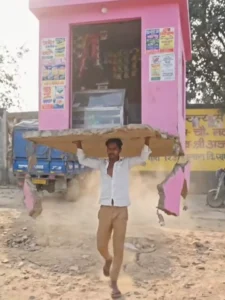
A hyper-realistic cinematic video created from my uploaded photo as the base.
The same house visible in the photo remains in its original place.
The subject from the photo stands beside the house.
The ground shakes gently as cracks spread outward and loose soil breaks apart.
With natural, realistic body motion and subtle breathing, the subject grips the base of the house with both hands and slowly lifts it from the ground.
Dust and small debris fall as the house comes free, foundation and soil pieces dangling.
The subject raises the house above shoulder height and begins walking forward while carrying it.
Smooth physics-accurate movement, natural hair and cloth motion, soft sunlight rays, real-world shadows, and cinematic depth of field, 4K hyper-real live-action realism, no exaggerated expressions.
How To Generate Your Video
Now, to create it using Flow, here’s what you’ll need to do: First, we provide a prompt. Copy it. Then, below, you’ll find the Create Image and Video options. Click on them. Then, you’ll go directly to the Google Flow website. This Google Flow website will help you generate your videos. First, sign up with your email address. Then, you’ll find the New Project option. Click on it, and then do what you need to do there: change the Text to Video option to Frame to Video. This will allow you to upload your photo and generate it. You’ll be prompted to upload two frames. First, you simply upload the photo I just explained in detail, and then paste the prompt you copied. Now, re-generate, and it’ll only take a few seconds. By the time the hundred percent count is reached, you will see that your video will be created and ready there.
Conclusion
This is my first article on ai editing. If you like this one, I’ll be teaching you new editing techniques in the future, which you’ll enjoy even more. I hope you’ll enjoy it. If you do, please let us know, and we’ll bring you more new editing techniques.