Main Nai Auna Capcut Template – Videos featuring the “disappearing” effect are still going viral on Instagram, and people continue to love them immensely even today. When I first saw this editing style, I was quite impressed by it myself. Consequently, I decided to share the template with you and show you exactly how to create this type of viral video. In this article, we will learn two different methods to achieve this effect. The first method involves using a CapCut template, while the second is a manual editing process where we will learn how to create this effect directly within the CapCut app using any of your own video clips. I will walk you through every single detail, step by step, so you can follow along and create your own video right away.
Details Of Main Nai Auna Capcut Template
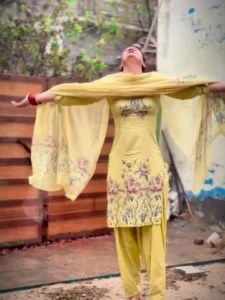
Let me explain why this particular editing style is currently going viral. The reason behind its viral popularity is its “disappearing” effect. Furthermore, it syncs exceptionally well with the accompanying song. Consequently, the video begins with a blur effect. This is followed by a slow-motion sequence. In the subsequent section, you need to perform a specific action—such as adopting a melancholic expression or spreading your arms wide. This is where the special effect kicks in, causing your entire body to gradually vanish. We refer to this as the “Star Dust” effect. You can find this feature within the CapCut app; it causes your entire physical form to disappear, leaving behind only the visual effect itself.
How To Use Main Nai Auna Capcut Template
First, let’s learn how to perform automatic editing—specifically, editing using templates. Afterward, we will discuss the other editing method. Since we already have a template, we can simply click on “Check Template” right here, which will open it directly within the CapCut application. Now, the prerequisite here is that you must have the CapCut app installed. If you don’t have it yet, go ahead and install it. Once you view the template within the app, you will see a complete preview of the video. After reviewing the various elements included in the template, click on “Check Template” at the bottom; from there, you can add your own clips to create a fully professional video. This is an incredibly simple method, and—just so you know—you can also access this feature directly within the “Templates” section of the CapCut application itself. You can create your video from there as well by simply adding your clips.
How To Do This Editing Manually?
Now, let’s learn how to edit this manually—specifically, how to create this effect by hand. It is quite simple. If you wish to edit this manually, the first step is to import your video clip into CapCut. Next, navigate to the specific point in the video where you want the frame to freeze completely. At that spot, go to the ‘Effects’ section and search for the ‘Stardust’ effect. Once you select this effect, you can apply it to the subsequent portion of the video clip; this will introduce the ‘disappearing’ effect. As the subject fades away, your video will be finalized in a truly professional manner. And just like that, your editing is complete.
Conclusion
So, in this article, we learned how to perform this editing using both automatic and manual methods. I explained this using very simple steps, and I am confident that you must have appreciated it 100%, as I made every effort to present it in the simplest possible manner. If you enjoyed this, please be sure to let us know in the comments; we will bring you even more amazing editing techniques in the future.