Trending Ai Girlfriend Video Editing – Some such videos are going viral on Instagram right now in which people are creating their videos with such a girlfriend and after watching this people are getting impressed a lot. People feel like creating such videos, but they do not know how to make such videos with their photos. Look, the important thing in this is that your photo with girls is going to appear in it, so if you are even a little interested in this, if you want to create such photos, then I will tell you how you can do this editing. I will tell you everything step by step. You just have to follow and create it.
Details Of Trending Ai Girlfriend Video Editing
Look, creating this editing requires two steps. The first step is to learn how to create a photo using a prompt. Using that prompt, we’ll create a 100% perfect face in our photo. Then, in the second step, we’ll learn how to create a video. For that, you’ll need to understand how to create one. Once you learn this, your video will undoubtedly go viral. Let me explain both of them in detail, and you’ll need to understand them thoroughly so you can see the best results.
How to Create This Image
To create a photo, you will need a prompt. Look here, the prompt is provided below the image in the article. You can copy it there. After copying, you will find another button below. Create Your Image, so you have to click on that button. This is the Google Gemini button where you will be shown the created image for free. After going there, you have to first paste the prompt. Then go to the Plus option. There you can upload a photo of yours and after uploading the photo, you have to click on the Generate option there. This takes only a few seconds. Now, the photo that will be generated will be ready with your AI girlfriend. Now let us explain how to convert it into a video.
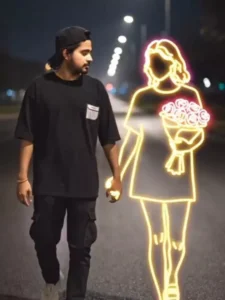
Young man walks alone on a dimly lit path at night, wearing dark casual clothes and white sneakers. Beside him appears a Golden glowing neon-style illustration of a girl holding a bouquet of bright red roses.
The neon girl emits a soft white light, contrasting against the dark, blurry background of city lights in the distance. The atmosphere feels calm, melancholic and slightly surreal, blending reality and imagination. 100% accurate my face, both holding hand middle of road
How To Generate Video
You created the photo after creating the video, so you may not understand how to create a video, because people often don’t understand it at the time of video creation, and whether it’s a good photo or a good video, it’s not possible to generate it. We’ll use the photo we took ourselves. Look, here you’ll see a video prompt, so copy it. Then, below, you’ll find the “Create Your Video” option. Click on it. After that, you’ll sign up, and a new project option will appear. Go to it and select “Frame To Video” instead of “Text To Video.” Then, go to the “Plus” option and upload the photo. Then, click on “Generate.” But remember, you’ll also need to paste the prompt here. You’ll need to copy it and then generate it. Your video will be created and ready in a few seconds.
CONCLUSION
If you can convert a photo into a video, these Commission details will be useful to you. I’ve explained all the details in detail, and your editing will be absolutely perfect. If you need to understand anything else, or if you’re not sure, please let us know. How does this editing work, and how can you go viral with it?