Tu Dil Me Rahti Hai VN Code Template – Nowadays, the trend of editing short videos is gaining momentum. You’ll see people going viral on Instagram by creating such short videos. If you want fast and professional editing, you can use templates. If you want to create the most viral editing of the moment using just two photos, I’m going to tell you in this article what kind of editing you can do and how easily. To create this kind of editing, we’ll use the VN Editor application, which will make our editing absolutely perfect. In this article, I’ll explain what a VN Editor is, how to use templates, and what tricks can make it go viral.
What Is VN Editor?
Look, VN Editor is a video editing application in which you can do any kind of editing very easily. It is absolutely beginner friendly. It is a video editing application. If you want to start editing, then you can start with this, but we are going to talk about one of its best free features, which is called VN Code Template. We can use code template in it, in which primitive transitions are already there. Auto lyrics are already there in it. You just add a clip there and all that thing will be applied on your video. You can export your video in very high quality without any hindrance.
How To Use Tu Dil Me Rahti Hai VN Code Template
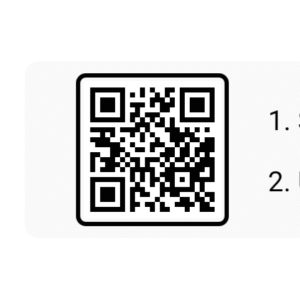
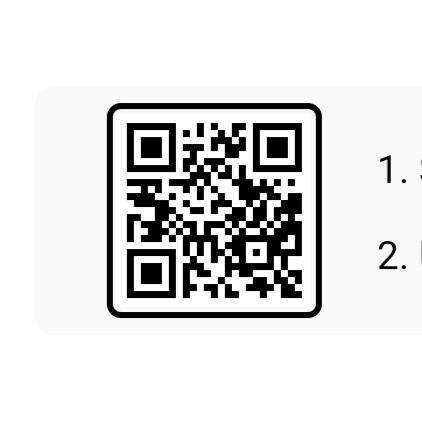
How to create a video using code? I’ve already provided the code in the article. You can save it or take a screenshot of it and open the editor application. Within this, you’ll find a scanner option. Clicking on it will take you to the gallery, where you can select the code. Once you select the code, you’ll get a project file. You’ll need to download this project file, as you can’t edit it without downloading it. After downloading, simply click on it and select two photos. Add your photo and your partner’s photo and click Next. This will finalize your video and make it ready. When you feel the editing is perfect, just export it and you’re done.


2nd Code:-
What are the benefits of using code?
Look at this viral editing method. Some of the benefits of using it are that you can create professional videos with just two photos, without having to make keyframe adjustments. You don’t have to add or write lyrics. You can easily do this kind of editing through automation. The 9:16 ratio of real is automatically obtained. You won’t face any problems while exporting. Your video is exported in just 5 seconds. This method is perfect for editors from beginners to pro level. You can use it easily.
Which are the mistakes that you should not do at all.
If you are using code or doing this kind of editing, then you have to use two photos, so always keep the quality of the photos high. If you do not have a good photo, then enhance it, oh no, you can enhance it by using an application. Do not adjust the aspect ratio of the template or you have to crop your photo accordingly first so that you do not face any problem. While exporting after adjusting, you do not have to reduce the resolution. You have to fix it at 1080p 60fps and export it because it is best for the Shorts platform.