Viral Couple Snake Ai Video Editing – Ever since AI entered the editing field, everyone has become incredibly creative. Everyone is creating unexpected things that will surprise you. One such video is going viral, based on a snake. Creating it isn’t too difficult these days, and I’ll tell you what kind of video you want to make. You can call it funny or even creative. How can you create a video? It’s very easy to create. I’ll explain all the steps in this article. By following them, you can create a good video. Your editing will yield excellent results. What if you edit by following these steps?
Details Of Viral Couple Snake Ai Video Editing
If you ever do any editing, then I want to tell you that you should not miss some things at all, you should not misuse it at all, for example, if you ever do editing, then you should create it using your own photo or video because you are its owner. You give permission for it that you can use it, but if you use someone else’s video clip or photo clip, then you must take that permission for that. You should not misuse it at all. It is not that if you create such a video using someone else’s photo or video, then it will be very wrong. You will have to suffer some consequences for this. It is better that you take permission or you use your own video or photo, you should never misuse it.
What are some mistakes you should never make?
Because if you’re creating such videos today, we create them from the floor. You need to understand that whenever we create a video from the floor, we need to provide a reference image. For example, we’ll need a reference image. For that, we’ll use a reference image that relates to the scene. For example, a video of a tree lifting a building went viral. The image used was something like this: you’d simply stand near a house, place your hand underneath it, and pretend you’re lifting it. Take a photo of it while doing so. Similarly, if you’re creating a photo like this, you’ll need to stand on the side of the road or in the middle of an empty street. After that, take a photo and use that image. You’ll get a good result.
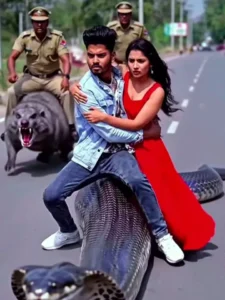
8-second cinematic fantasy comedy chase video, ultra-realistic, 4K film look, REFERENCE IMAGE REQUIRED FOR MAIN BOY ONLY, STRICT FACE LOCK – USE EXACT SAME PERSON, preserve 100% facial identity from uploaded reference image.
Do NOT change, beautify, stylize, age, or replace the boy’s face. Maintain exact facial structure, skin tone, hairstyle, and expression continuity.
Boy’s face must remain clearly visible, front or 45-degree angle, well-lit, no obstruction, no blur, no shadow covering face.
Scene & Action Breakdown (Precise Timing)
0.0–1.5 sec
Cinematic rural road environment, warm daylight, dust in air.
A large realistic cobra-like snake is moving fast on the road.
The main boy (REFERENCE FACE LOCKED) and an AI-generated beautiful girl are sitting on the snake’s back.
Boy sitting in front, girl behind him holding for balance.
Boy’s face clearly visible to camera, medium shot, cinematic lighting.
1.5–3.5 sec
Police officers appear behind them chasing aggressively while riding strange animals (AI generated, realistic but slightly funny — like goat, buffalo, or giant dog).
Police vehicles and dust visible in background.
Camera tracking from front-side angle, keeping boy’s face visible and identity preserved.
3.5–5.5 sec
Snake quickly turns and enters a dark underground burrow (large tunnel hole in ground).
Boy and girl duck slightly and disappear into tunnel.
Camera follows from front angle, boy’s face still visible before entering hole.
5.5–7.0 sec
Police also reach and immediately enter the same tunnel riding their animals.
Fast cinematic motion, dust particles, dramatic urgency but comedic tone.
7.0–8.0 sec
Inside tunnel, cinematic dim lighting, funny dramatic moment freeze.
Boy looking forward confidently, girl slightly scared.
Police visible behind entering tunnel.
Camera & Identity Protection Rules (IMPORTANT)
* Always keep boy’s face visible, front or 45-degree angle
* No back-only angle of boy
* No face obstruction
* No face modification
* Maintain same identity across all frames
* Prioritize identity preservation over cinematic effects
Visual Style
ultra-realistic, cinematic lighting, dramatic shadows, shallow depth of field, volumetric dust, realistic snake movement, film grain, 35mm lens look, fantasy realism, meme-comedy tone, smooth motion blur, high detail textures.
How will we make this video?
Look, there’s a very simple way to make a video. You have a prompt ready. I’ve already created it and given it to you. You just need to copy it here. Click the copy button. It will be copied. Then, below, you’ll find the “Create Video” option. Click on it. Go directly to the Google Flow website and sign up first. Then, click on the “New Project” option. From there, you’ll change the “Text to Video” format and then “Frame to Video.” After that, you’ll get a few options. One is to paste the prompt, after that, we’ll have this. Go to the “Plus” option below and upload a photo. You can upload the photo there. Then, you can generate it. Just wait a few seconds and you’ll see a great result.
Conclusion
I hope this viral edit has been helpful to you, as I’ve tried to convey the essence of what people are really enjoying on social media. Creating it is very easy these days, but it may require some effort. I’ve outlined the simple steps. Follow them and create them.