Weird Bug Effect Ai Video Editing – There’s a constant trend of AI videos on Instagram. We’ve seen this trend that’s going viral right now. People are creating a lot of their own AI videos, and I’ll tell you how to create each type of video and how simple it is. When it comes to editing, people often look for the easiest way to do it, and my method is the easiest. It doesn’t require much effort. You just need to understand a few things properly, and your editing becomes a proper one. I’ll explain it step by step. Follow it and edit as quickly as possible, and you’ll get excellent results.
Details Of Weird Bug Effect Ai Video Editing
The main reason for editing to go viral is the unique effect it provides. Let me tell you what you get. First, you have to click a photo of your eyes open. Then, in this photo, it is shown that a worm moves and goes inside your eyes. Let me tell you, this is an AI video. This is not done in real life, so creating such effects and the effects you see on social media is a little difficult. People show you on their computers, but our method is very simple. We will teach you how to create this thing on your mobile and I will also tell you step by step how you can do it. For this, we follow two steps: first, we will generate the image, then we will create the video.
How To Create Ai Image
First, let’s learn how to generate images and how to create such photos. Creating photos is quite simple. If you have a prompt, you can easily create them. First, click a photo of yourself. You can take a photo of your eyes in a simple landscape mode on your phone. Now, click on the generate option. Here, you will get an option to create an image. Click on it, and it will go to Google Gemini. There, you will upload the photo you just clicked. Then, paste the form provided in our article for generating images. Now, when you generate, you will get a photo with a result like this. What you have to do is do it from here.
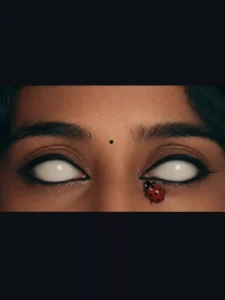
Image Prompt –
Ultra realistic close-up portrait of a woman's face, focus on eyes, completely white glowing eyes without pupils, smooth skin texture, cinematic lighting, soft shadows, a small red ladybug sitting near the lower eyelid, high detail, 8K resolution, dramatic mood, dark background, sharp focus, professional photography style
Video Prompt –
A close-up cinematic shot of a woman's face with glowing white eyes, slight slow motion movement, soft blinking effect, realistic skin texture, a red ladybug slowly moving near the eye, dramatic lighting, dark cinematic background, high detail, smooth camera zoom in, 4K quality, realistic animation
How To Convert Image Into Video
Now after that, here we will learn how to convert these generated photos into videos. Now see, you have to use the photo you clicked and the one you generated, so for that we will use the Google Flow website, the link of which I have given here. You will go there by clicking directly and there you sign up and go to New Project. There you will get two options. One is Start and the other is Frame. In the Start frame you have to select the photo. Upload the photo. In the first frame you have to select the photo which you have generated. In the second frame you have to select the one which you have clicked and just send it. It will take a few seconds and it will make a proper video of yours and will be ready.
Conclusion
By following the correct Instagram methods, you can create a proper and unique video, with impressive results. Let me explain the editing in a completely different way, and you’ll get some amazing results. I’ve explained everything step by step. If you like it, please follow us and let us know about these things and the results.