Instagram Milestone Poster Ai Photo Editing Prompts – On Instagram, you will notice that this particular style of editing is gaining immense popularity. In this editing style, you showcase your Instagram profile—specifically displaying your follower count—alongside large-format text. If you wish to create this kind of viral content, then today’s editing article is just for you, as it provides a comprehensive guide to this specific technique. We will cover all of its features, explain how to post the final result, and identify the best tools to use for creating such photos. We will also discuss which editing tools are currently considered the best options available today. You will learn all of this and more in this article. By reading through it, you will gain a wealth of valuable insights and information.
Details Of Instagram Milestone Poster Ai Photo Editing Prompts
Now let me explain what you will see in editing? You will see something like this in editing. First of all you will see the text. It will be in 3D and there will be a metallic text and that will be your follower count. You will be made to sit there. Then after that your background in the top will be divided in two parts. In that you will see your followers on the top side and your photo on one side and then the text which will be there below will be 3D. It will be set in it and it will look like a post type thing. If you want to do an editing of your milestone then this will be absolutely best for you.
Best Editing Tool For Photo Editing
Speaking of the best editing tools available right now—and which one would be the best choice for you—ChatGPT is currently delivering the most outstanding results. You could also use Google Gemini; however, while ChatGPT allows you to generate only a limited number of images, Gemini offers unlimited generation capabilities. That said, if you opt for Google Gemini, the results you get will not quite match the quality provided by ChatGPT. So, for the time being, here is what I recommend: if you need to generate just four or five images, use ChatGPT to create your photos. Doing so will ensure you get images that look absolutely realistic.
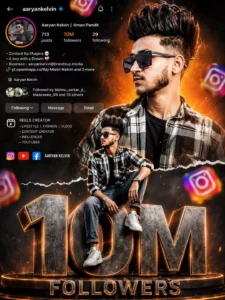
Ultra realistic Instagram design. A stylish Indian teenage boy wearing black sunglasses, black-white check shirt, blue jeans and white sneakers. Two different poses of the same person - one upper-body stylish portrait looking sideways at the top right, and one full-body sitting pose on giant metallic 3D "1.5M" text at the bottom center. Bright orange cinematic gradient background on top background at bottom Content Ke KhajareA boy with a DreamBuchess-asyentevine2offerzone.in/whats Aaryan Kelvin Followed by bishnu sarka with smoky dark greyand Mes separated by torn paper effect. Include realistic Instagram profile Ul on left side with username, followers count, Following reels creator details, bio text and social icons. Add floating 3D Instagram logos around the scene with depth blur. Add glowing orange sparks, cinematic lighting, dramatic shadows, high contrast, ultra HD 8K quality, realistic skin texture, DSLR depth of field, stylish influencer vibe.The giant "1.5M" text should look metallic steel with orange glowing edges and circular platform below it. Add "FOLLOWERS" text below. Add handwritten signature style FOLLOWERS
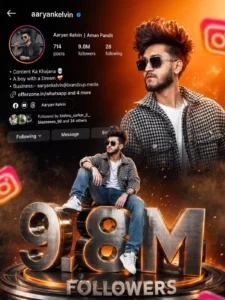
Vibrant Instagram milestone poster celebrating 100k followers. The main subject (Luis) is stylishly posing in two different positions - one full-body sitting pose on top of a big 3D metallic "100K" text with floating Instagram icons, and another half-body stylish photo above with torn paper effect transition between orange gradient and grey background. The top section shows an Instagram profile interface with username , Rajan EditZ follower 100k count, bio, and icons.
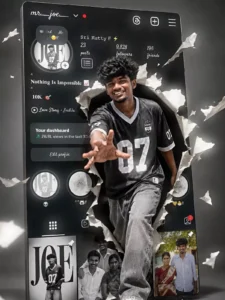
"CREATE A SURREAL, CINEMATIC IMAGE IN HIGH 4K RESOLUTION." KEEP THE PERSON'S FACE IN THE ORIGINAL PHOTO UNCHANGED. WITHOUT ALTERING ANY FACIAL FEATURES OR STRUCTURE AN ASIAN WOMAN, AS PICTURED, IS STRIDING CONFIDENTLY OUT OF A GIANT SOCIAL MEDIA SCREEN (A FACEBOOK-STYLE PROFILE INTERFACE)THE 3D PAPER-TEARING EFFECT IS INCREDIBLY REALISTIC: THE SCREEN IS RIPPED OPEN. AND PIECES OF TORN PAPER FLY AROUND, CREATING A SENSE OF SPATIAL DEPTH. THE WOMAN SEEMS TO BREAK FREE FROM THE DIGITAL WORLD AND STEP INTO REAL LIFE DYNAMIC POSE: ONE FOOT STEPS FORWARD. ONE ARM REACH ES TOWARDS THE CAMERA, CREATING A SENSE OF MOVEMENT AND STRONG DEPTH. BEHIND IT IS THE PERSONAL PROFILE INTERFACE WITH DETAILS AS SHOWN IN THE IMAGEAVATARUSER NAMENUMBER OF FOLLOWERSCONTROL BUTTONS (DASHBOARD. REELS. IMAGES... MINIMALIST GRAY STUDIO BACKGROUND, CINEMATIC LIGHTING.STRONG. HIGH CONTRAST. SHARP SHADOWS HIGHLIGHTING THE CHARACTER. STYLE PHOTOREALISTIC. CINEMATIC. SURREAL. HIGH-END ADVERTISING. ULTRA-DETAILE
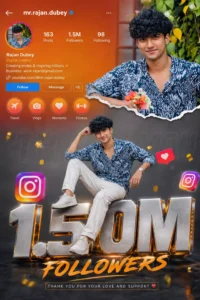
Vibrant Instagram milestone poster celebrating 1.5M followers. The main subject (Rohan Editz) is stylishly posing in two different positions - one full-body sitting pose on top of a big 3D metallic "5.10M" text with floating Instagram icons. and another half-body stylish photo above with torn paper effect transition between orange gradient and grey background.The top section shows an Instagram profile interface with username. 1.5M count. bio, and icons. Generate photo
How To Create Ai Image
To create a photo like this, first locate the image you wish to replicate; you will find the corresponding prompt listed directly beneath it. Copy this prompt. Next, open ChatGPT. You can access ChatGPT via a web browser, the dedicated application, or whichever method you prefer. Once logged in, click on the ‘+’ icon and upload a photo of your own—any standard, normal photograph will suffice. Finally, paste the copied prompt and click ‘Generate.’ The process may take a few moments, but it will produce your finished image with excellent results.
Conclusion
I am confident that you must have absolutely loved this trending Instagram editing style. If you enjoyed this editing technique, please let us know in the comments; we will bring you even more amazing editing tutorials like this one, enabling you to create even more stunning photos. All you have to do is comment and tell us exactly what kind of editing styles you are looking for. Whatever you need—just drop a comment—and we will bring that specific editing tutorial to you.